Tuesday, June 16, 2020


FINAL REFLECTION/THOUGHTS

Where to start?? I'm blown away by how much I have learned from this one course!! It's been AWESOME and SUPER ENGAGING!!!  I have to say I was very nervous going into this course but I'm so glad I was able to be apart of it because it has truly been the highlight of my journey in the Master's program thus far!! I feel blessed to be apart of this truly amazing learning experience as I know I have gained so much knowledge and can't wait to share it with my colleagues.

                                      REMEMBER TO REMOVE THE BARRIERS

First of all, I feel that "Presumed Competency" was one of the big highlights for me!! 
"Presuming competence is about giving someone a chance and helping them take that chance in any way you can."  Teachers need to stay positive and believe in the success of all students/children. Ted Talk by Todd Rose's "Myth of Average" was a big eyeopener for me. It discusses the importance of "One Size does not fit all" approach to learning/education. Each and every student is unique and has different needs and backgrounds. We really need to take a look at the child and know that "Average" does not exist. I loved the way Todd Rose compared the Cock Pit of an aircraft to the classroom and how the average seating did not work for everyone. This is also true for the classroom. Little things do make a difference and it could be as simple as changing the chair for the child, providing pencil grips, or allowing them extra time. This is important and could be the means of changing the lives and success for so many children in our Education System. 
The Universal Design for Learning is extremely important to ensure that everyone has an equal opportunity to be successful and reach their full potential. I also found this video to be quite informative and useful!! Interesting to watch and learn to be more accomodating to our future students/children.s


Just to think about Tyler, Matthew, Jake, and Carly (Leslie Brouns Article) and other children we have read about throughout this course was truly inspirational and heart-wrenching. It was great to see how Universal Design for Learning supported these children and allowed each and every one of them to find success. Through Assistive technology, support, guidance, perseverance, and determination from caregivers, teachers, assistants and teachers, it is clear that it's important to be patient and consistent with children and it will certainly be rewarding for all. 

THIS IS ONE QUOTE THAT WILL ALWAYS BE ONE OF MY FAVORITES!!


ABUNDANCE OF VALUABLE RESOURCES:
Another major highlight was being introduced to so many amazing RESOURCES!!! These resources can be so beneficial as a teacher especially during such a challenging time like we are experiencing right now. It's great as teachers to be able to provide the necessary resources to ensure that all children can have the necessary tools, accessories and resources to be able to learn and grow.


Some of the Resources include:

1.  Book Creator: Students can get creative by designing their very own digital books. Teachers can also create their own teaching resources. I highly recommend Book Creator!! Very engaging and I absolutely loved our group project of creating a book as a valuable resource tool. I'm sure every student would love this too1! 


2. Read and Write for Google: this is a highly accessible google chrome extension. This allows students to use tools such as text to speech, predictive text, picture dictionary, translator, quick definition, and tons of other study skills. AWESOME RESOURCE!!!! I will forever continue to use this and introduce it to others.

3. Mentimeter: This is a polling tool that allows you to set up questions, surveys, etc. Now your target audience can give their input using a mobile device to submit input. I like that it's anonymous!!  

4.Wheel of Names: Excellent resource tool for classrooms and other group functions. You list all the names on the wheel and then spin the wheel and it randomly selects a person. Great in so many ways in that some kids may always be speaking whereas others may not get the chance. In this way, everyone gets an equal opportunity for a chance to be selected to speak. Great for many different classroom activities. 

5. Unite for Literacy: Another great classroom and home resource for students, parents, and educators. A wide selection of topics and books in a variety of themes. Available in French and English. You can also use the search bar to search. It's awesome. LOVE THIS!!

6. CAST Website: Great Resource for teachers, educators and parents that offers an abundant amount of information, support, and professional learning surrounding Universal Design for Learning.

7. Understood: This is a great resource to share with parents. A resource that supports thinking and learning differences and helps give reasoning and aid understanding to support these differences

8.EdWeb: this resource is designed to help you with online learning and collaboration as we all strive to cope with virtually learning during this pandemic.  THIS IS A MUST SEE!! LOTS OF SUPPORT!!

I am so thankful for the blog that I have created!! It will be an awesome tool/resource as we move forward in our careers as Educators. There are many more Resources and I'm sure I have mentioned them in my other blog posts. I will always be able to refer to this in the future to help me to better accommodate my future students. 

APPS APPS and MORE APPS

Another HIGHLIGHT was learning about all the APPS available to assist students in all areas!! I know I have listed these in a previous post but I have to say I was blown away with the number of apps that I was never introduced to. Some I was familiar with but there were so many that will be super beneficial moving forward not only as a teacher but as a parent of two children. It's amazing how many of the apps available are free and easily accessible for all learners. 


As teachers it's important to go the extra mile, provide the best support, eliminate the barriers, keep an open mind, and strive to do our best to create a classroom that embraces the UDL and AT Framework. In the end, we will all feel better and feel rewarded for allowing every child an opportunity to achieve their goals and reach for the top. GET RID OF THE AVERAGE STATE OF MIND BECAUSE IT DOES NOT EXIST!! Every child deserves that equal opportunity and we need to be there for them. Universal Design for Learning framework and including multiple forms of ASSISTIVE TECHNOLOGY should be at the forefront of how we deliver Education. Needless to say, I have gained so much from this course and will always be thankful for this wonderful learning opportunity. This course was definitely the highlight of the Master's Program thus far. What a WONDERFUL ENGAGING EXPERIENCE. 

All Blogs, assignments, projects, writeups, and online classes were amazing and so informative that I have truly grown in this learning experience as a student, teacher, and parent. I can't wait to share my knowledge with others and especially my future students. 

Thanks so much BARBARA WELSFORD for delivering such a wonderful course. I also want to thank all of my colleagues and classmates (Cohort 25). We are in this together and it's amazing how much we learn from each other. Thanks to everyone!!  


Monday, June 15, 2020

Three Takeaways from the last class!!!


1. Unite for Literacy was absolutely amazing and all I can say is WOW!!! This was definitely one of the most valuable resources shared in our final class. It is so beneficial for teachers, students, parents, and absolutely amazing for home-based learning!! I'm sure there are many people out there like myself who did not know this type of resource was available!!

I love that you can actually listen to and read all the books in multiple languages which is highly valuable for teachers having to assist ELL children enrolled in our school system.

The books actually eliminate so many social barriers for kids by offering a variety of topics that accommodating children from various ethnic backgrounds. This website accommodates children from different nominalities, races, genders, and disabilities. I like that you can use the search bar at the top to look up books of interest. It's amazing offering so much variety. I know I will continue to use this resource in my future endeavors.


2. EdWeb was another awesome online learning experience for teachers. It's great to be aware of such great learning tools to aid with our movement to a more technical/virtual world. This site offers free online learning through webinars and other professional learning experiences for administrators, educators and parents as they cope and deal with the new type of web-based learning. Another amazing benefit is this site is free!! I am very excited to further my learning through this site where I will be able to continue learning to be better able to assist teaching my future students and as assist my children in their education and learning. It's ideal that you can take a quiz after each webinar and earn a certificate!!! I have already mentioned this to a few of my close teacher friends and one of them messaged me to thank me for introducing them to this wonderful resource.

3. My final takeaway from the last class was definitely READ & WRITE FOR GOOGLE

                                                           
I want to commend everyone on an absolutely awesome Presentation!! Every presentation was engaging, informative, and very well presented. It's amazing to see all the different ways we were able to put our minds, thoughts, and experiences together to come up with an amazing presentation. It's absolutely amazing how much I have learned through these presentations and seeing the creative measures taken to deliver such valuable information. We were able to deliver such wonderful tips, useful information, and a fully descriptive and comprehensive package for anyone wanting to get a better understanding of the Read & Write for Google Chrome Extension.
HATS OFF TO EVERYONE FOR AN AWESOME PRESENTATION!!!!! I'm sure we all were able to gain valuable tips and techniques from each and every presentation as they were so uniquely presented and truly beneficial!! BIG SHOUT OUT TO BARBARA WELSFORD for introducing us to this and so much much more.


Thursday, June 4, 2020

Reflection: Class #3


3 Main Takeaways

1. Hosting a Dinner Party/Katie Novak
Katie Novak creates a great analogy of UDL in our Education system. Who would have thought Hosting a dinner party would be so challenging? There is one simple solution to both scenarios which Katie Novak does an awesome job presenting in her presentation video explaining the Universal Design for Learning. A MUST SEE!!!

Given the list of dietary restrictions, allergies, likes, dislikes, and other limitations it was clear that it's impossible to create that one dish that would be suitable or a good fit for everyone. We were quick to realize that the best solution to catering a dinner party like this would be to offer choice selection and variety to allow people choice and freedom to choose the foods appealing and suitable to them. This activity really allowed me to put things into perspective and compare this type of situation to the classrooms where we have such a diverse range of learners. Each child is unique and brings to the classroom their own likes, dislikes, strengths, weaknesses, background knowledge and the list goes on. However, just like the "Dinner Party" activity it's important to provide the students in our classrooms with the tools, choices, and options that will provide a comfortable, adaptable and effective learning environment for all our diverse learners.  It's important to accommodate the diverse needs and be willing to offer flexibility, choice/variety, and support to ensure that we are allowing all students to achieve their goals and find success through means that best suit their needs, interests, and learning styles. 

Watch this amazing video presented by Katie Novak: What is UDL??


2. Apps Galore: WOW!!

It was quite intriguing to learn about the countless number of Literacy based apps available and most are free which is extremely helpful. I have used a variety of different apps as a parent and educator for the past 12 years but today I was introduced to a number of unfamiliar apps and ones I had never explored before. We are always looking for good apps to use at home and in schools to help our children/students in various areas of the curriculum. Being introduced to these apps were very beneficial to aid in the learning process of our students and children.

Keeble:
(Writing App) is an app that makes it easier for people to type and speed up your typing. Visually, it's highly customizable. This app allows users to change color and font and also includes a dyslexia font. This app also reduces typos and slipups by selecting keys on release and speaking as you type. There is a predictive feature that offers suggestions based on what you are typing.

y

Montessori Crosswords: 
(Reading Remediation App) Kids can choose the desired level and move up accordingly. It enables them to move from simple 3 letter words to more complex words. It is user friendly and provides sounds, animations, and interactive visual effects. Kids can easily drag and drop letters to their appropriate places to spell the assigned word. Kids can listen and hear the letter sounds while applying the appropriate letter to make the word.  This app helps with Reading/Writing and also building vocabulary. 
Available in French too!!! YAY!!!


 Phonemic Awareness Bubbles:
This app will help prepare your child to develop phonemic awareness skills necessary to set the foundation of the reading process. It will aid the reading process by helping your child learn the primary sounds of the letters of the alphabet. Using this app, children will be able to identify the beginning sounds of words and help them understand that words are made up of sound units known as phonemes. This app is a great learning tool for beginners and students who struggle to read. There are games children can play in this app to allow the learning process to be more engaging, fun, and realistic for the learner. 
One game is a matching game where students/children are directed to match pictures to the same sound. The second game is an elimination game where children are directed to get rid of the picture that does not have the same sound. The Third game is analyzing 2 images and decide whether or not the two images have the same sounds. 


Speech Tutor:
Speech Tutor is a speech therapy app that makes the face visually transparent as sounds are being made. The animation is viewable at three speeds and can be paused at any time for practicing positioning and articulation as you move through the sounds. Speech Tutor offers a "Side View" and "Front View" of each sound production. This app is very helpful in that it allows students to see where they are being successful and where further speech therapy is needed. There are 132 animations and a recording capability. WOW!!! 


Immersive Reader:
This is an app that is a highly valuable tool in that it uses techniques to improve reading for people of all ages and ability levels. It helps to increase fluency for ELL as well as readers of many other languages. It helps to build confidence for emerging readers learning to read at higher levels. This app offers text decoding for students with different learning abilities such as dyslexia. 


Iris:
This is a software that makes computer screens/monitors easy on the eyes. It helps to prevent eye strain by optimizing screen pulsations and controlling the brightness. It reduces eye pain by matching the screen brightness with the light around you and will automatically adjust to a suitable setting. This software can also improve sleep by regulating blue light and this will help your body to produce more melatonin at night. 

Voice Dream Writer:
Voice Dream Writer will help people compose better-written work. It provides Text-to-speech,  proofreading to help reduce mistakes, phonetic, and meaning search to help you use the right words, and an active outline helps you organize and improve the structure of your writing.


Snapverter

Snapverter is an add-on for Read&Write for Google that converts printed documents and inaccessible digital files into readable PDF files to make it  easy to share and for reading aloud in Google Drive. This app can quickly transform classroom papers, images, and eBooks into accessible, Google Drive-friendly files. Snapverter uses smart OCR technology that can easily recognize text from worksheets, handouts, book pages, and other printed materials.  GREAT APP!!! 


There are so many valuable tools and apps available and all we have to do is EXPLORE!!! There is always a solution to a problem. No matter the obstacles, disabilities, or challenges, there is always a way to help our students grow, learn, and achieve their full potential. 


3. The UDL Powerpoint Presentation was so informative and engaging. It's amazing just to see how far our education system has come!! So much improvement and tweaking to meet the diverse population of children in our education system who equally strive to learn and find true success. As most of us recall, life in the classroom in our past was nothing like what we are experiencing today!! All I can say is FINALLY!! There is a light at the end of the tunnel!!! The PowerPoint was a great way to see how UDL started, what UDL means, and various steps and in-depth measures it took to design this universal model with Assistive Technology and other valuable resources playing a major role in its design. Needless to say, it took an abundance of hard work and determination to design the UDL framework and to start incorporating it into our education system. Hats off to the many supporters, developers, Educators, and leaders!! 

THE OLD WAY


This was the way it was!! Was it Fair? Was it right? My answer is NO!!! I recall getting my report card in grade 4 and passing with flying colors but watched my close friend/cousin shed tears to know that he had to repeat the grade!! I felt torn!! Can you imagine how this child felt? Yes, he was trying, Yes he worked hard, Yes he was intelligent!! BUT Was he treated fairly? NO!! I'll never forget that day!! He just needed something more than what was expected. We grew up in that sad old system "One Size Fits All"!!! Sadly, he repeated the grade and moved through school barely scraping by and doing his tasks/work the old fashioned way with no extra support, accommodations,  provisions, etc... Was he successful in life? Hell YES!! Thankfully he found great success!! He finished grade 12 with not the best average but it was a pass!! He moved into a field of high interest at a recognized college and successfully completed a technological trade where he now works in Alberta repairing, updating and rebuilding systems and computers for some large industries and companies. How many people do we know lost confidence, dropped out, and became discouraged due to the way the education system was designed and delivered. Students were expected to complete the same tasks, same assignments, and tests regardless of their abilities and needs which was damaging and set so many intelligent children up for failure to achieve their goals. 

CAST WEBSITE
I thoroughly enjoyed exploring this amazing website that provides everything you need to know about UDL!! There are videos, charts, resources, activities, and so on to help provide a better understanding of the Universal Design for Learning. I found this a very valuable tool while working on the Read and Write for Google assignment. I will definitely continue to use this website as there is so much there that could help as I continue to work in the Education field and be the mom of two children enrolled in the school system.


Please view this video that is on the Cast Website explaining the theory behind UDL and how it works. Please View


UNIVERSAL DESIGN FOR LEARNING GUIDELINES

Watch this Video


Wednesday, May 6, 2020


"Take the Pencil out of the Process"
By: Leslie Broun

In the article, "Take the Pencil out of the Process", Leslie Broun uses her voice to discuss the importance of allowing children to use a keyboard for writing tasks as an alternative for handwriting/printing. Broun makes special reference to those children with Autism Spectrum Disorder and other disabilities who often feel frustrated when having to perform various pieces of writing. She feels that students who are granted these accommodations may feel more capable and be able to express themselves better and more freely. Their responses are more likely to provide more words/longer sentences (Quantity) to provide higher quality performance in required writing tasks. 

Reading this article was extremely interesting from beginning to end. I was engaged right from the get-go!!! I found it very interesting to learn the background information of children with ASD and the way it impacts their motor abilities. Researchers have discovered that these motor difficulties are caused by the neuroanatomical differences and abnormalities of the cerebellum. There are two movement difficulties that are experienced by ASD children are Hypotonia (Low muscle tone and strength) and Apraxia (impairment in the ability to execute skilled movements despite having the physical ability and the desire to do so). These two conditions affect an individual's ability to use their hands and have significant impact on an individual's ability to hold and use writing implements. Reading this information has made me reflect on the various students I have witnessed struggling with these difficulties in the classroom. I think about the way they must have felt knowing that the person next to them was breezing right through while they sit there struggling to express their ideas on paper using a pencil. Why did we allow this to happen with the many accessible accommodations available? This article has enlightened me to always cautiously monitor students' working within the classroom environment. When we see the signs presented by Broun, it's important to stop and re-evaluate how we can help this child succeed.  It may be as simple as allowing a child to use a keyboard instead of a pencil. No harm in trying!!!!

I have been a Primary/Elementary Substitute teacher for 12 years. I have taught in all grade levels from K-6 including a few short-term replacements.  It is quite evident that technology is advancing and becoming a big part of our education system today. With these advancements, the "Pencil Vs. Keyboard" transition brings forth so much controversy. There are some people who are all for it, some who are totally against it and then some that have neutral/mixed feelings. I have heard things like "Allowing children to use a computer to write is making them lazy" and "I don't want my child to use technology to write because they need to develop the essential handwriting/printing skills." Whether we agree or disagree, as teachers, our best interest is to provide the best learning opportunities for our students to ensure that each and every child has equal opportunities to succeed and feel good about their work and achievements. If this means allowing students to express themselves using a keyboard rather than a pencil, then we MUST make it happen for the benefit of the child. 

I have experienced many children over the years who struggle with the writing process for so many reasons. Some of these reasons include students struggling with fine motor skills, letter formations, forming sentences, staying within the lines, and those students who have specific disabilities (ASD) that cause them to struggle in this particular area. In these circumstances, many children fail to meet their full potential due to not being able to get their answers, thoughts, and opinions on paper using a pencil BUT  is this fair to these students/children? As Broun mentions, the most important product is students knowing the answer to the questions or tasks and being able to communicate their thoughts and ideas in an effective manner. Students should not be penalized for the mode they used to communicate their answers and ideas. Students who are given the choice to accommodate their abilities and needs will feel more comfortable and confident to provide good quality answers with sufficient adequate quantity where they will be able to express themselves effectively.

This article was a great read, I absolutely enjoyed it from beginning to end as it was very easy to relate to as a growing teacher. I can only hope that teachers will be able to adjust to the assistive technology measures to accommodate diverse needs and abilities.


              "Fair is not giving everyone the same thing. Fairness is giving each person what they need to succeed"

While reading this article, I kept dwelling on this quote in my mind. Every child is different in their own unique ways. It's important to take the time to look at each child to understand what each child requires for them to meet their full potential. When a child is struggling in a specific area of the curriculum due to a disability (ASD) or weakness, I feel it is highly important for teachers to recognize his/her needs and be able to provide the child the appropriate tools, resources, and materials to ensure that they too are able to express themselves the same as any other child in the class. 


Monday, May 4, 2020


Three Main Takeaways Class #2

Everyday | Classroom | Learning quotes, Quotes about children ...


The First takeaway from today's class that was very engaging and eye-opening was using the understand.org website.  I chose a grade 2 student struggling with reading. I chose this area and grade level because I have a little boy the same age who is also struggling with reading. Just hearing the little child speak about her feelings and frustrations was very heartwrenching. This activity enlightened my understandings of what it's like to struggle with reading through the eyes of a young child. The little girl explained how frustrating it is to sit in her seat watching other children finish their work quickly while she just sat there continuing to struggle. The little girl Maya said she felt like she couldn't do it and that she wasn't learning but everyone else was. As a teacher, we often don't take the time to think or feel through the eyes of a child and are ignoring the signs of frustration. This is so unfair and damaging to the struggling reader and many other children who require scaffolding supports and assistive measures to achieve their goals. It's time to take the plunge to provide the appropriate assistance through technology, resources, materials and other sources to ensure that every child has an equal opportunity to succeed. We need to ensure that through their eyes they also feel like they are learning, achieving, and succeeding just like everyone else. In this course, I have already gained so much knowledge about the many ways we can provide adequate resources through various forms of technology, devices, applications, and other useful interventions that can be incorporated easily into our classrooms. 


The second takeaway was being informed about all the accessibility supports available on apple products including iPhones, iPods, Ipads laptops, etc. After class, I decided to hop onto the Apple website to do some exploring myself. I wanted to know about all the accessible features available and where to find them on the devices I currently own. I decided to go through all the features available on Apple devices and make a list. To find out more, you can visit the Apple website to better direct you on how to find all features on your devices. https://www.apple.com/ca/accessibility/

Here is a list of Accessibility Features:
(The apple website has the features divided into 4 categories)

Visual

  • Voice Over- tells you what's happening on your screen and will talk you through tasks.
  • Display Accommodations- making it easy on the eyes. You can adjust the views to make it better for your situation. For example: Changing contrast and colors. 
  • Magnifier- works like a digital magnifying glass to increase the size to be able to see items/text more clearly.
  • Zoom- A powerful built-in magnifier that can enlarge a section of the screen so you can see content more clearly.

Hearing
  • Live Listen- lets you fine-tune your iPhone hearing aids/pods to help you hear more clearly.
  • Facial Expression with Facetime- Allows people to use sign language to communicate.
  • Closed Captioning- More than just reading dialogue. It allows you to display the sound effects and music while engaged in a movie or T.V. show. 
  • Noise App- it allows you to track the decibel levels and ambient sounds to let you know if the sounds are negatively affecting your hearing. 
  • Siri- You can change the mode to "Speak mode" or "Type Mode" to better suit your needs.

Mobility:
  • Voice Control- You can use simple vocalized commands to access and interact with apps. 
  • Switch Control- it allows you to use built-in features such as switches, joysticks, or other adaptive devices that can control what's happening on your screen.
  • Siri- will allow you to manage your house and music with your voice. For Example Hey Siri, turn on the lights. 
  • Assistive Touch- For people who have trouble with standard gestures such as pinch or squeeze. You can customize gestures to fit your needs.
  • Apple and Activity Apps- Allows people in wheelchairs to track their pushes instead of steps to keep them motivated and moving.
  • Accessibility Keyboard- this keyboard can be customized to give users advanced typing and navigation capabilities.
Learning (Supports Learning Differences)
  • Speak Screen- will be able to read the words from books, newspapers, emails, and other print materials. This will allow people to turn a reading experience into a listening experience. 
  • Typing Feedback- with this feature turned on it will give you spoken feedback including text corrections, word suggestions as you type.
  • Guided Access- allows parents, teachers, and other caregivers the power to monitor the time spent on an app. 
  • Safari Reader- This app reduces the visual clutter such as advertisements, buttons, navigation bars, and so on. 


Lastly, I absolutely love the collaboration activities!! The activity where each person was asked to share a website or app in google slides connected to Remedial Reading. It was absolutely amazing the number of resources, apps, and websites that are available to assist with Remedial Reading. There were a number of websites and apps that I wasn't quite familiar with that I have since explored with my children. Collaboration activities like this are very engaging as it allows us to learn about new tools and resources available and to share our experiences with others. In this way, we can help each other better assist our students/children in developing effective learning strategies, skills, and techniques so that each and every child can be successful.

Ipad Apps for Learners with Dyslexia
https://www.callscotland.org.uk/common-assets/cm-files/posters/ipad-apps-for-learners-with-dyslexia.pdf


Saturday, May 2, 2020

Book Creator: Bringing Creativity to your Classroom

Book Creator: Bringing Creativity to Your Classroom


Book Creator is an app that enables users to create eBooks and is a tool that provides accessibility for all learners.  This tool can be used independently as well as collaboratively to create a variety of texts to support the learning needs of students ranging from primary to secondary school. This resource enables alternate access for students with diverse learning needs, through features such as alternative text, speech to text, text to speech (read to me), audio transcripts, and tools such as a pen to enable writing and drawing.  For example, this tool can be utilized with students in the primary grades to create ebooks with simple words and pictures (drawing).  As students' technological skills advance, elementary and secondary students can be adventurous with features such as importing images, videos, and links, as well as audio recordings to demonstrate an understanding of any curriculum area or content. 


Book Creator Benefits:

  • Cross-curricular (Can be used for all subject areas such as Math, Science, Health etc...opens the door to explore the curriculum in a more creative context.
  • Good for ALL Grade Levels
  • Collaborative (Working together and sharing experiences)
  • Accessibility (Voice text, ALT text, Read to me)
  • Interactive
  • Visually Stimulating
  • Videos
  • Links
  • Graphics

How to Incorporate Book Creator in the Classroom:

  • "All About Me" Books
  • ABC Books
  • Science Projects 
  • Musical Ebooks
  • Retellings
  • Journals
  • Portfolios
  • Poetry
  • Graphic Organizers
  • Podcasts
  • Comics
  • Personal Dictionaries
  • Research Projects
  • Photo Books
  • Math Concepts
  • Autobiographies
  • Book Talks
AND MUCH MUCH MORE!!!!!!

Check out this Link of 50 Ways to incorporate Book Creator in the Classroom!!
By Dan Kemp


Using Book Creator Poster

Thursday, April 23, 2020

Making Secondary Literacy

Accessible to ALL


After Reading and Reflecting on the article titled, "Making Secondary Literature Accessible for All," I feel very informed and enlightened and I can't help but think about my own personal experiences as a substitute teacher and parent. How can we help children achieve their goals if we are not willing to take the time to look at each individual child and ask, "What needs do my students have in literacy?" Knowing this information about each child will allow us to use the appreciate measures, tools and resources to provide the best possible instruction for our students. It's impossible to effectively help students if we fail to ask ourselves this question. This question is a critical component of ensuring our students are effectively learning and achieving their goals. However, knowing the area of need and being able to provide the necessary support whether physical, visual, or social will eliminate so much stress from both the student and the educator. 

The Authors, Christy Palmquist an Heather Prenevost, stresses the importance of paying close attention to the amount of scaffolding support we are giving our students. We want to keep in mind that too much support could create laziness and create dependent learners. These students will always depend on high levels of teacher support and fail to take risks where they would be able to engage in critical thinking to discover and learn new things independently. On the other hand, we don't want to frustrate our students with work tasks that are too difficult by not providing an adequate amount of supports. Educators must be very careful to provide the right amount of support that will help students learn and achieve their goals but at the same time encourage them to become independent thinkers and learners. 


Palmquist and Prenevost also make reference to the National Reading Panel's Five Pillars of reading (Phonemic Awareness, Phonics, Fluency, Vocabulary and Comprehension). They use these pillars as a guide to address the various strategies and tools accessible to aid students of different abilities. They compare the Pillars of reading to the Pillars that support the roof of a house which creates a very strong visual representation for the readers. As we are well aware, a roof requires all pillars of support in order to provide a solid and stable structure. With one or two missing the house structure is unstable. The same is true for a child learning to read. In order for students to become successful and independent readers, it's crucial that we address all 5 pillars of the reading process in order to support the learning process. 


In addition, I feel that this article was a great read. As educators, we need to be aware and sympathetic to the various demands, learning styles, abilities, and realize that each and every child is unique and has different levels of ability. We need to start by looking at each individual child to assess where each child needs support. The authors provide effective strategies, techniques, and support that we incorporate in our classrooms to provide the best possible level of support so that each and every child will become confident and successful independent learners. 

As we are aware, Assistive Technology is extremely useful and important to assist students who have learning impairments. After listening to Tylers story in the last class, it was quite intriguing, motivating, and truly inspirational to see how Technology supported his disability and enabled him to grow and learn effectively in the classroom setting. Tyler's story touched my heart!! Despite the challenges Tyler was able to stay focused, determined, and motivated to press on to achieve his goals. Tyler was obviously given adequate and effective supports which enabled him to keep pursuing his goals in life. It was clearly evident that hard work, determination, and the proper amount of supports allowed Tyler the opportunity to share his wonderful story today and most importantly feel proud of the young intelligent man he has become!!!


Sunday, April 19, 2020


April 4th Class: 3 Main Takeaways!!

The first online class for Universal Design for Learning and Assistive Technology was very informative, engaging and eye-opening!! I feel very challenged as technology is not one of my strengths. However, I am very excited to learn and develop new skills and techniques to help provide an enriched learning environment that supports diversity.

NOTE: I will definitely be using Menti and the Wheel of Names in the future. This is really cool!!!

My three main takeaways from the first class are as follows:


1. The "Myth of Average" video
This video by Todd Rose was extremely motivating and interesting. He certainly hit a "soft spot" for me and I felt an emotional connection. I have a child in grade 2 who is struggling to meet the curriculum outcomes. As a teacher myself, I realize that in today's classrooms, there are so many other distractions and demands and as a result, children are being denied the help and assistance needed to meet their needs.

One of the Key components was "Jagged Profile" meaning that every child is different. Students are not one dimensional and there are no average children. Rose states a curriculum designed for the average is designed for nobody. Each and every child enters the classroom with their unique learning styles, talents, strengths and weaknesses. A curriculum designed for the average learner should be banned. The curriculum must be designed to support diversity and to ensure that all students have an equal opportunity to learn and be successful. We can't assume that "One size fits all"!!! Designing a curriculum in this way is truly a waste of time and energy as every child is different.

Another highlight in the video was "Adjustable Seats" which is simply providing accessible technology, resources and materials to meet the needs of the learner. Adjustable seats could be as simple as providing pencil grips, tactile seating and others. For technology, teachers can provide Chromebooks, sound systems, Ipads and much more. By providing these adjustable seats we are nurturing student development and allowing all children to have an equal opportunity to demonstrate their knowledge, talents and strengths. I feel that providing these supports are very crucial and would eliminate so much stress for both the learner and the teacher.  Knowing that you are meeting the needs of all children to be successful would be the best feeling in the world. 


2. Tyler's Story and Journey

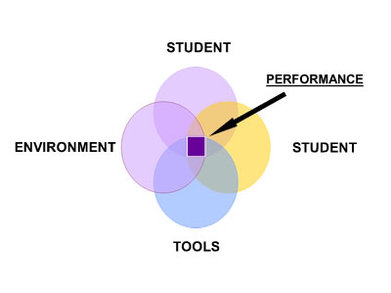
What an absolutely amazing and inspiring story!!! This was by far the HIGHLIGHT of the class just to see how this amazing young man was provided with so much support and given the necessary and best "adjustable seating" tools to be a successful learner. As the years went by and technology was advancing and changing, Tyler was provided with the tools and resources to press on and achieve his goals. Despite the challenges and obstacles faced, Tyler's motivation, determination and hard work paid off. Assistive Technology allowed Tyler to be successful and access the world through various forms of technology. WOW!!! In addition, I was enlightened by how the SETT framework supported him over the years. Thanks so much Ms. Welsford and Tyler for sharing this amazing story!! It was definitely the most memorable experience of the day!!!


Picture

3. Book Creator

As the saying goes, "YOU LEARN SOMETHING NEW EVERY DAY"!!! Prior to this class, I had so much anxiety about it. During my years attending school in an isolated community, we rarely were engaged in technology as a form of learning. When I went to university, I would most often resort to writing research papers using paper and pencil because I was never really confident with using technology. However, after some practice and time, I developed the basics and the necessary skills to respond to emails, type letters, papers etc... I am very delighted to be apart of this course and I am excited to pursue this course to gain more knowledge and confidence to incorporate technology more and more in my daily routine at school and at home.

Despite the initial problems experiences of moving into our different groups, I absolutely loved using this program. I feel that this could be a very useful tool for children of all ages at home or at school. Book Creator would is an awesome tool where students can explore audio, text, and images to create ebooks, journals, posters and portfolios. Students can choose text features such as color, size, font and so on. They can use their creativity to explore the many features that this wonderful program has to offer. An added benefit is that children can explore individually or in a group setting. I love the way it is so user friendly and that with proper guidance and step by step instructions, students could have so much fun with this program. 


Making Secondary Literacy Accessible to All!!

                                                              FINAL REFLECTION/THOUGHTS Where to start?? I'm blown away by how mu...

Class #1 (April 4,2020) - 3 Main Takeaways